Ask a question about hospital prices. Keep the answer. Let an agent pick it up later and work with the same report you are looking at.
That was the whole request, and it sounds like an afternoon's work on a dashboard. It went through query execution, saved state, navigation, publication, and every assumption about what an agent can safely read off a screen.
PGHT Reports is where it landed: a reporting workbench, conversational queries, personal report definitions, and tools for agents, all sharing one piece of state.
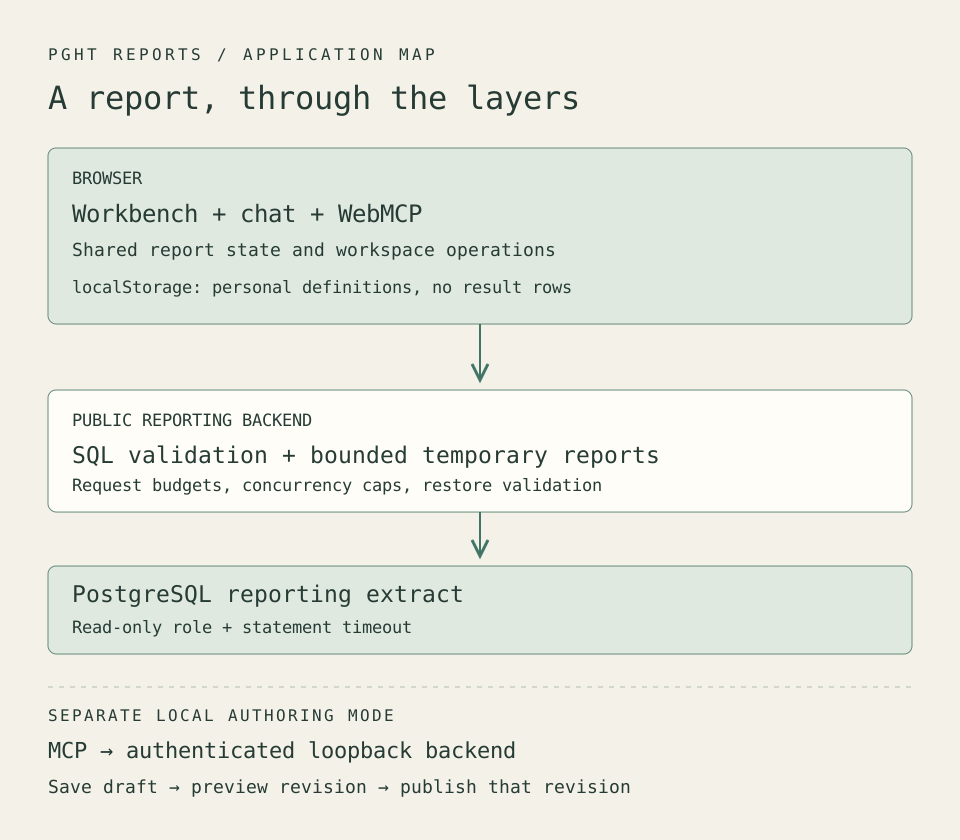
Open the diagram at full size.
What a row means
The broader PGHT project ingests Pittsburgh hospitals' published standard-charge files and builds source-aware queries over them. I wrote about the reconciliation work in Four traps in hospital price data.
The reporting application runs on a separate extract: 22,428 observations across five hospitals. That is a count of rows in one extract. Not patients, not contracts, and not the size of the full PGHT corpus.
The distinction gets sharper once chat makes querying easy. A question in plain English can compile to SQL that runs perfectly and compares two things that should never sit in the same table: different care settings, different billing classes. The query succeeds. The answer is worthless.
Tooling can show you what a result contains. Deciding whether the comparison means anything is still your job.
Where a question goes
A question in chat reaches the reporting backend's AI route, and the SQL it proposes hits the query guard before anything executes. Builder output and restored report definitions get validated too, each on its own path.
The guard rejects multiple statements, write operations, data-modifying CTEs, and SELECT INTO. It restricts tables, schemas, columns, and functions, and applies a result-limit policy. An allowlist of functions stops an otherwise ordinary SELECT from reaching arbitrary database internals.
Reading SQL as a tree
The parser turns SQL into an abstract syntax tree. The guard can then ask what each node does, instead of trusting a string that happens to begin with SELECT.
CTEs make that concrete. A name defined by WITH is a scoped relation, so the resolver tracks where the name is visible and checks the physical tables underneath it separately.
Statement type alone will not save you. A parser may label something select while it contains SELECT INTO or a data-changing CTE. So the guard walks the nodes, rejects recursive CTEs, and refuses multiple statements. The same walk checks aliases, derived tables, columns, and functions against their allowlists, and applies the row bound to the complete outer result, UNION and INTERSECT and EXCEPT included, rather than trusting one branch's limit.
Two layers, doing different jobs. The AST decides what a query may touch. The read-only database role and the statement timeout decide what it can do when the AST is wrong. That role is deployment configuration rather than application code, which is worth saying out loud: point the app at the wrong account and the second layer quietly disappears.
Public mode also bounds request size, rate, concurrency, and the number of temporary reports. Excess concurrent requests get rejected instead of piling into an unbounded queue. A fluent model response never grants permission to bypass any of it.
Keeping the visitor's work
A read-only demo has one specific failure: every useful experiment evaporates the moment the tab closes.
Three ways out of that, and two of them I did not want. A shared write surface hands strangers a mutable public dataset. Accounts mean operating a sync service and holding other people's data, on a portfolio project, indefinitely.
The third option keeps the work in the visitor's own browser. That is My Reports.
Copying a report saves its definition to localStorage: name, query or builder state, presentation settings. Rows are fetched fresh when the report opens. The browser keeps the recipe, not the meal.
On reopen the backend validates the definition and runs the query before registering a new temporary report. Builder-origin definitions recompile from their builder state; SQL-origin definitions go back through the guard. So a backend restart or an expired temporary ID costs nothing, because the report rebuilds itself on open.
The limits are deliberate and visible: 25 reports, with size bounds on each definition and its SQL. Invalid stored data blocks further saves until reset, so a damaged workspace never gets silently overwritten. And it lives in one browser profile, on one origin. Clear your browser data and it is gone. Open the site on your phone and it was never there.
Nine tools the page already had
WebMCP's imperative API lets a page register tools through document.modelContext. The nine tools here cover shared and personal reports, and they are not a parallel API. They call the same workspace operations the buttons call.
Which means a browser agent opening a report changes the report the person is looking at.
Data access takes more care than handing back whichever rows sit in memory. Opening another report clears the previous snapshot, so a request during loading or after a query error gets that state rather than stale rows dressed up as a successful answer. Responses cap at 50 rows, 50 columns, and 512 characters per cell, with truncation flags. Context separates the filters a report asked for from evidence the executed query applied them.
Publishing happens somewhere else. A local MCP server handles authoring, and publication there requires a successful preview of that same draft revision. Edit the draft and you preview again. The gate proves the draft was tested; it proves nothing about whether a human agreed to it, and anyone needing that has to build it. A browser tool call never reaches any of this. It stays in the browser and never picks up the local author's publication rights.
What the tests could not see
The component suite was green. Then I opened the workbench at 1440x900 and found the report clipped underneath the library, with an empty third column parked where the layout expected content.
Nothing in that suite could have caught it. jsdom does not lay anything out. It will cheerfully assert an element exists while a real browser paints it underneath something else. The outer grid had three columns and two things to put in them.
The repair collapsed it to two: report area and chat pane, with the library as a sub-grid inside the report area. Chat width moved onto a custom property on the outer container so the resizable column participates in the layout instead of floating on inline style, and the resize handle moved to a native PointerEvent with setPointerCapture, so a drag terminates on pointercancel rather than leaking a window listener.
The subtler bug surfaced the same way. Chat width persisted correctly, but a detour through a phone-width viewport clamped the stored preference down to 240px and left it there. Rotate back to desktop and the width you picked was gone. The fix splits the width you chose from the width that currently fits: preferredWidth persists untouched, effectiveWidth clamps at render time. No component test would have scripted that sequence, because the sequence is a person turning a phone sideways.
The same lifetime problem shows up in async work. A preview can finish after someone has switched views or opened a different report. Work survives across the paired Report and Chat views; navigating to a different context invalidates the old result, so a slow request cannot land on the wrong report or interrupt a later conversation.
The widest gap sat between services. Copying a report calls two backend tasks, export and restore, and the frontend build carrying those calls was tested against a mock of the backend: 473 tests, all green. The backend on the demo host did not implement the tasks. Its catch-all answered unknown tasks with a stubbed success, so the copy failed one layer away from the real cause, surfacing as a validation complaint about a missing definition. One click on the Make a copy button against the live server found what the suite could not. The tests proved the adapter honors the contract; nothing had checked that the contract existed. The release verifier now probes every task the frontend calls against the real origin and treats that stubbed success as a failure, and the copy path is checked by a full export and restore roundtrip, not by the absence of an error.
Verification ran the frontend and backend suites, then went to the browser for native tool calls, saved-report behavior, resizing, and phone navigation. A real chat query returning the extract's row count tied the visible interface back to actual backend data.
What I want to learn next is how people use these operations together: which reports they keep, what they ask an agent to inspect, and where they go back to the visual interface. The project walkthrough collects the demo and its controls.